Four things the AI makes, and one thing it never decides
MediaBlaze generates the script, the voiceover, the still graphics and the motion graphics for a clip — and it can generate your channel's production elements too. What it does not do is decide what the story is. That stays with you, and every piece below is built around that split.
Written to your shot list, not to a headline
The shot list is the input, and it is the whole reason to trust the output. You describe what happens on screen, in order; the narration is written to that. A model guessing a story from a headline writes copy that does not match the pictures, and in news that is not a style problem, it is an accuracy problem.
- Claude or Gemini, chosen per team, on your own key. The provider is a switch in Settings, and the account that pays is the one whose key is stored.
- Rough notes are enough to start. An AI draft turns your notes into a timestamped shot list you then edit. It reads no video and saves nothing by itself — it is a first pass, not an authority.
- Or skip the AI entirely. Paste a script written outside MediaBlaze and the clip is badged Your script instead of AI Generated. The voiceover reads exactly what you wrote, and the rest of the pipeline is unchanged.
- The badge is permanent, so months later anyone can see whether a script was written by a person or a model.
A broadcast read, mixed for air
The script becomes a synthesised voiceover and the voiceover is mixed into the video — not handed to you as a separate WAV to line up yourself. Natural sound is attenuated under the narration, and can be ducked so it drops when the voice comes in and recovers when it stops.
- One air-ready file out. Narration and natural sound baked into one stereo pair, which is what a playout platform wants.
- And separate tracks when you need them. The Premiere export keeps narration and natural sound apart, because a flattened mix cannot be pulled back apart in an edit suite.
- Consistent across hours of programming — the same voice at 3am as at 9am, which is most of why a channel sounds like a channel.
- You hear it before it is mixed in. The run pauses after the voiceover and waits for you. That hold is the subject of the next section.
Stills and motion, for the shots the footage doesn't have
Wire video rarely covers everything a script says. A market story needs a chart the agency didn't shoot; a preview needs a card the footage never contained. MediaBlaze generates both stills and motion graphics — real generated video clips, 1080p and 16:9 — as part of the same run, and hands them to the editor alongside your own elements.
- Generated per story, not from a template library. The visuals are made for the shots this script actually needs.
- You can direct it. A
GRAPHIC:line in the storyline overrides the model's judgement about a shot, and asking for movement gets you a motion clip rather than a still. - Opt in, priced in the open. Graphics are a checkbox, and the checkbox says it costs extra per graphic on top of the script and voiceover, before you tick it.
- Generated before the voice, deliberately — so a graphics failure has not yet spent voice credit.
Generate the channel's own elements too
Slates, bumpers, transitions, lower thirds and bugs are the visual furniture that makes a channel look like a channel — and the usual answer is a designer and a two-week turnaround. Describe one instead, preview it, and either keep it or throw it away.
- This one previews before it saves. Try again, save to the library, or discard — nothing is filed until you say so.
- Saved elements are first-class assets, filed by kind and by show, reusable across every segment the channel makes.
- Placed by hand, always. Nothing auto-drops a slate, because nothing about a slate is tied to a particular shot.
Whether any of it airs
The run stops itself
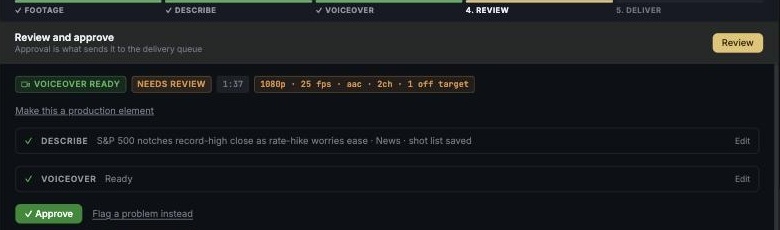
After the voiceover, before the mix, the run halts and the worker exits. Nothing waits on a timer and nothing proceeds because a queue drained. A person listens, then approves or sends it back.
Approval is what packages it
There is exactly one control that turns an approved clip into a deliverable package, and a person operates it. Delivery then asks again, because delivery cannot be recalled.
Your keys, your bill, itemised
Script provider and key are per team. A per-run ledger records the provider, the model and which account was actually billed — visible in Settings rather than arriving as a surprise invoice.