A frame-accurate timeline, in the browser
Enrichment produces clips. A channel needs segments. The editor is where several clips become the thing that actually airs — arranged, retimed, dressed with the channel's own furniture, and rendered back into the library as an asset like any other.
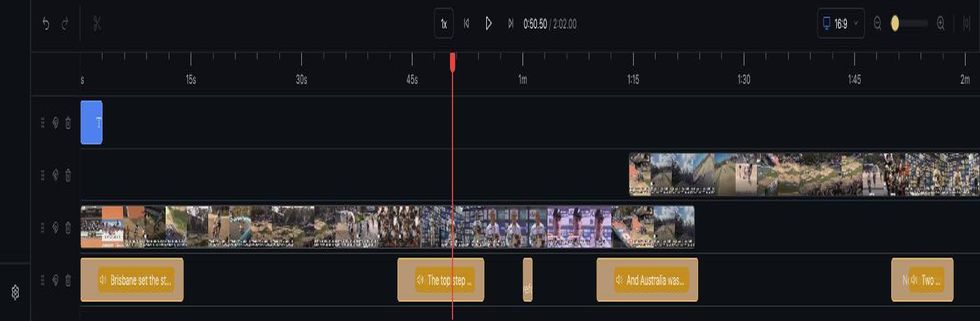
You don't arrive at an empty timeline
This is the part that surprises people. Tick the clips you want, in the order you want them, and choose Create Composition — and the editor opens with the work already done. The script has been written, the voiceover recorded, and both are already placed on the timeline, aligned to the clips they belong to. You are not assembling a segment from parts. You are reviewing one and dressing it.
- Clips in your order, voiceover tracks under them, each sitting against the footage it narrates. Nothing to line up by hand.
- Then you add your own elements — slates, bumpers, transitions, lower thirds, bugs — because that is the part a machine shouldn't guess at. Nothing auto-drops a slate; nothing about a slate is tied to a particular shot.
- Cuts land on a frame. The snap grid is one frame, derived from the composition's own frame rate — not a rounded tenth of a second that puts every edit three frames off.
- A click is a click. Selecting a clip cannot nudge it: a drag only begins once the pointer has actually travelled, so a hand twitch on a zoomed-out timeline no longer moves a clip by seconds.
- Voiceover stays on its own track, so retiming a cut doesn't cost you a re-record.
- Two media panels, deliberately separate — your team's uploaded elements, and the graphics generated for this story. You always know which is which.
- Then render. It runs serverlessly and comes back into the library as an asset badged Composed — not a tab you have to babysit, and on the same road to air as everything else.
From there it is a package and a delivery: two clicks and a confirmation, and the segment is at your playout partner with its ad breaks declared.
And a way out, when a story deserves a human editor
Not every story should be cut in a browser. Export for Premiere builds an AAF bundle — the timeline plus the media it references — that opens straight in Premiere's import dialog.
- Split audio by default: natural sound and narration arrive as separate tracks, because a flattened mix cannot be pulled apart again in an NLE.
- Or exactly what aired — the embedded rendition is available too, for when the question is "what went out", not "let me recut this".
- The bundle carries its media. Handing over a timeline with no media is a support ticket waiting to happen.
The escape hatch matters more than it sounds. It means adopting MediaBlaze is not a bet that every future edit can be done inside it.